
ScatterChat was an encrypted instant messaging client for activists and dissidents. The Hacktivismo group, which grew out of the Cult of the Dead Cow (cDc), released it in July 2006 at the HOPE hacker conference. It was built on the Gaim chat client and added end-to-end encryption and built-in Tor routing for networks such as AOL Instant Messenger. The project was abandoned long ago and is no longer maintained, and in August 2006 researchers published flaws in its encryption (one is tracked as CVE-2006-4021), so it is not safe to rely on today. In November 2026, people with the same need use maintained, independently reviewed tools instead: Signal for end-to-end encrypted chat, Briar for peer-to-peer messaging over Tor, and Tor Browser for anonymous browsing.
About This Guide
The ScatterChat developers published the guide below as “Scatter Chat User’s Guide, Revision 0.2,” dated July 14, 2006. The text describes how the software worked at the time. Where facts have changed since 2006, the change is noted in place. The software itself, its download files and its mailing lists are no longer offered anywhere on this site. SC Privacy Desk, the independent site that now uses this address, has no connection to the ScatterChat project or to Hacktivismo.
Table of Contents
- Introduction
- Philosophy
- Preparing to Use the Software
- Using the Software
- How to Avoid Getting Tricked
- Tor
- Advanced Features
- Dealing With Problems
The original guide thanked Trammel of the cDc Ninja Strike Force for proofreading the document and suggesting changes.
It was dedicated “to those oppressed people who feel as if the rest of the world has long forgotten them.”
Preface
The authors meant the guide to be readable at every level of technical skill, including by people with no technical background at all. They told readers that if any part was still confusing after two readings, the guide itself was at fault. They also said that beginners unfamiliar with cryptography should read the whole guide from start to finish.
0. Introduction
0.1: What Is Cryptography?
Cryptography is the science of scrambling information so that people without permission cannot read it. Turning readable information into scrambled data is called encryption. Reversing the process is called decryption.
Take a personal diary that you want to keep away from nosy roommates, friends or family. Encryption software would scramble the diary text. Suppose an entry originally read:
November 8th, 2004: Today I purchased 400 shares of SCO stock. I feel so guilty!
After encryption it might look like this:
Ams0PouYH2DC5cv88BjY14D/scS9+zNHW3qWevqamKAEDOSZUEP1R08Mb63Vvnz7EqahDriAEqhMVJBDPwchQcmenYiwn3QcSrFzRz
Nobody can read the entry now unless it is decrypted. The holder of the right secret can reverse the process and recover the original text. That secret is called the encryption key. Anyone without it would have to try every possible key. With modern ciphers that would take an extremely long time, even for well-funded governments.
One warning still holds: a chain is only as strong as its weakest link, and the cipher is rarely the weakest link. Stolen devices, malware, bad software design and people being tricked cause far more real-world failures than broken mathematics.
Cryptography is a complicated branch of mathematics that some people spend their whole careers on. Using an encryption tool well, though, takes only a few concepts. They are covered in Section 2.
0.2: What Are Some Practical Uses of Cryptography?
Cryptography has many legitimate uses. A politician planning a campaign wants only trusted advisers to see the strategy. A pro-democracy activist planning a protest against an oppressive government has to keep the details secret. An ordinary person may want to keep a private medical conversation with a friend away from everyone else.
Criminals, spies and terrorists also have reasons to hide data. Section 1 looks at the social trade-offs.
1. Philosophy
1.1: Why Did Instant Messaging Need Encryption?
The instant messaging (IM) services of 2006 were insecure by design. Messages crossed many machines that the user did not control, and a central company server could read every message.
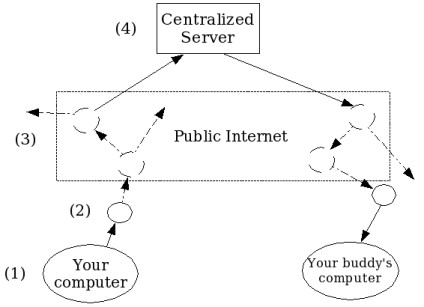
Figure 1.1
A message to a buddy might feel private, but in reality it passed through many points on the internet:
- It started on your computer.
- It went to your Internet Service Provider’s (ISP’s) router, a device that directs traffic (shown as circles in the diagram).
- It went out onto the public internet. Depending on how ISPs were connected, it might pass through a few routers or many.
- It reached a central server that forwarded it to your buddy. On AOL Instant Messenger (AIM), America Online ran this server. On Yahoo! Messenger, Yahoo! ran it.
- It went back out over the public internet to your buddy’s ISP and then to your buddy’s computer.
Any router on that path could record the message or pass it to someone else. That includes the router’s legitimate operators, attackers who had taken control of it, and anyone who could tap the physical lines between routers.
The central server at step 4 was the most valuable target of all. To intercept every message on the AIM network, an attacker only needed access to that one point, and a successful attack would expose millions of users at once.
Because instant messaging looked harmless, people regularly used it for embarrassing personal details, sensitive political topics, business secrets and probably government information. Hackers, organized criminals, industrial spies and intelligence agencies all had an interest in that traffic. The guide’s authors concluded that anyone who believed their unencrypted chats were private was being naive.
Both networks named here are gone. AOL shut down AIM on December 15, 2017, and Yahoo Messenger closed after July 17, 2018. The basic diagram still describes most chat apps, though. Messages still cross ISPs and a company’s central servers. End-to-end encryption, now standard in apps such as Signal, means those servers can no longer read the message content. They can still see metadata: who is talking to whom, when, how often, and from which IP address.
1.2: The Moral Questions Around Cryptography
A question that keeps coming up is whether it is right to build and share cryptographic tools when criminals and terrorists can use them to avoid justice. The guide argued that a careful look at the question supports building them.
Every technology can be abused. Terrorists use mobile phones to coordinate attacks. Criminals use cheap digital cameras to produce abuse material without a darkroom. Counterfeiters use high-quality printers. Nobody seriously proposes banning phones, cameras or printers for everyone, because they are valuable to ordinary people. If they were banned, determined criminals would adapt, find alternatives or smuggle the items in, and the underlying crime would continue.
The authors accepted that some people would abuse the software. They argued that its benefits justified it anyway. Ordinary users could protect their data from identity thieves, malicious hackers, stalkers, organized crime, corporate spies, intelligence agencies and other criminals. Before tools like this, most people did not know they could protect themselves, or even that they needed to.
The authors gave human rights as their main reason for building ScatterChat. Oppressive governments were moving to censor and control information. When the news is controlled, people cannot see what their government is doing or question it. The authors believed that secure communication gave people in those countries a way to share the truth and, over time, take back control of their lives. They hoped the software would become an important tool in that fight.
2. Preparing to Use the Software
2.1: First Things First
In almost any security system, the people using it are the easiest part to attack. Flaws in security software are common, but a smooth-talking attacker can trick users into giving in even more easily. This is called social engineering, and only a prepared, knowledgeable user can resist it.
For that reason, the guide told readers to get comfortable with ordinary instant messaging before relying on encryption for anything serious. A complete beginner who has never used a chat app will be overwhelmed once encryption is added, and is unlikely to use it correctly.
Its next step was a practice setup. Readers were told to make two IM screen names and send encrypted messages between them, either on two computers or on one. Most IM services allowed several screen names as long as each was registered with a different email address. The same practice still helps with any new secure messenger: test it with a spare account or a trusted friend before a high-stakes conversation depends on it.
2.2: Key Cryptographic Concepts
A real-world safe depends on two things: the lock and the key. Only the owner should hold the key, and the lock itself has to be sturdy.
Cryptography works the same way. The locks are called ciphers. Some are strong, some are weak, and some are weak but look strong at first glance. ScatterChat picked its ciphers for the user. It used AES, ElGamal and DSA, all well regarded in 2006, and its cryptography module’s documentation gave the technical details.
The encryption keys need special care. Anyone who steals your keys can usually read every message encrypted with them. ScatterChat claimed to limit this damage with perfect forward secrecy, a design that is supposed to keep past messages safe even if keys are stolen later. As Section 4 explains, researchers later found that ScatterChat’s version of this protection was weaker than true forward secrecy. Even with forward secrecy, a stolen key lets an attacker impersonate you in future conversations, so keys still have to be guarded closely. Section 3.1 described how ScatterChat created and protected them.
2.3: Authentication
Cryptography can also prove who someone is. This is called authentication.
Here is a simple example. Alice and Bob share a secret key. Bob moves across the country and gets a new email address. Later he contacts Alice from the new address, and she wants proof that it is really him. She writes a sentence:
You must be my lucky star! ’cause you shine on me wherever you are!
(It is a line from Madonna’s song “Lucky Star.”) She encrypts it with the shared key and sends Bob the result, which looks something like:
63VvHW3qWevqamKAEDOSZUEP1R08MbiAEqhMVJBDPv88BjY1wchQcmenYiwn3QcSrFzRzEqahDrAms0PouYH4D/scS9nz72DC
Bob decrypts it with his copy of the key and sends back the original sentence. Only someone holding the key could have done that, so Alice knows she is talking to Bob.
The example is simplified. Real systems use digital signatures for authentication, which are more secure than this challenge trick. They were beyond the scope of the original guide.
2.4: Traffic Analysis
Encryption hides what you say. It does not hide the pattern of how you communicate, and an eavesdropper can learn a lot from that pattern. This is called traffic analysis.
The length of each encrypted message can hint at what kind of message it is. How often messages are sent, when conversations start and stop, and the balance of sent to received messages can all reveal information. Sometimes these details are as sensitive as the messages themselves.
ScatterChat did little to stop traffic analysis. It added random padding to each message to make lengths harder to read. Section 4 explains that this padding scheme turned out to be part of a published flaw. It made no attempt to hide timing or frequency, because doing so would have made the software much harder to use. That left the risk with users.
The point still applies in 2026. Even with all your messages encrypted, the way you use a messenger can leak information about you. That metadata is what the EFF’s Surveillance Self-Defense guides warn about when they discuss communicating with others.
3. Using the Software
The sections below describe how ScatterChat 0.2 worked in 2006. The software is not maintained, so they are a historical record, not setup instructions.
3.1: Encryption Key Generation
To exchange encrypted messages, each user first needed an encryption key. The first time ScatterChat started, it showed a window titled “Encryption Initialization Window”:
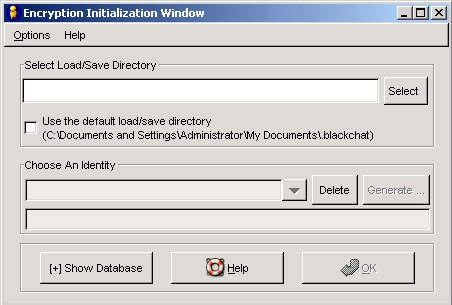
Figure 3.1
In the top section, labeled “Select Load/Save Directory,” the user chose where to store the new key. Most users kept it on the hard drive. More cautious users kept it on removable media, which in 2006 meant a floppy disk or a USB flash drive, so they could keep it physically close. Beginners could tick “Use the default load/save directory.” Others used the “Select” button to browse to a different folder.
Next, the user typed a name for the key in the box under “Choose An Identity.” The name kept multiple keys apart.
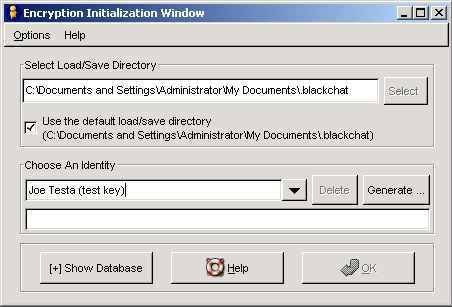
Figure 3.2
Clicking “Generate” opened a “Key Generation” window that asked for a password, entered twice. The password protected the file holding the key and was needed every time the user logged in with that key. A strong password stopped anyone who copied the file from using it. Clicking “Generate” again started the process:
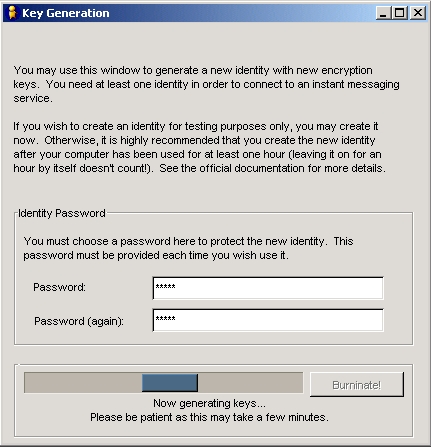
Figure 3.3
Generation could take a few minutes on computers of that era. When it finished, the user clicked “Close” to return to the Encryption Initialization Window.
The guide told first-time users to treat this first key as a practice key (see Section 2.1) and to create a separate “official” key once they had more experience.
3.2: Setting Up Instant Messaging Accounts
This step assumed the user already had an account on an IM service.
After generating a key, the user clicked “OK” in the Encryption Initialization Window and entered the key’s password. The accounts window then appeared:
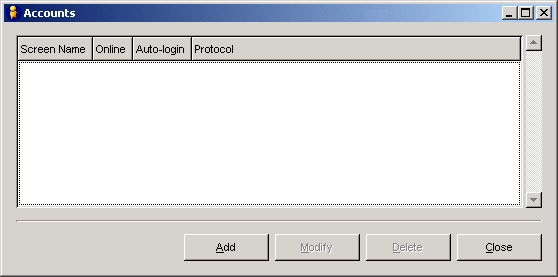
Figure 3.4
Clicking “Add” opened the account editor:
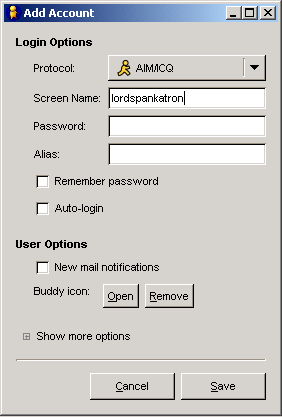
Figure 3.5
The “Protocol” box set the service. AOL Instant Messenger users left the default “AIM/ICQ” setting in place. The user then typed a screen name in the “Screen Name:” box and clicked “Save.”
Back in the Accounts window, the user could add more accounts or close it and go to the main login window:
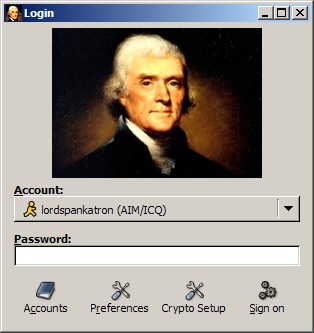
Figure 3.6
Entering the screen name’s password signed in to the service and showed the buddy list. None of this works now. AIM, the main network ScatterChat targeted, shut down in December 2017.
3.3: Using Encryption With Buddies
ScatterChat could talk to any buddy, but encryption only worked when both people ran ScatterChat. This was the core weakness of add-on encryption: protection only applied when both sides happened to have the same special client.
A normal chat window looked like this:
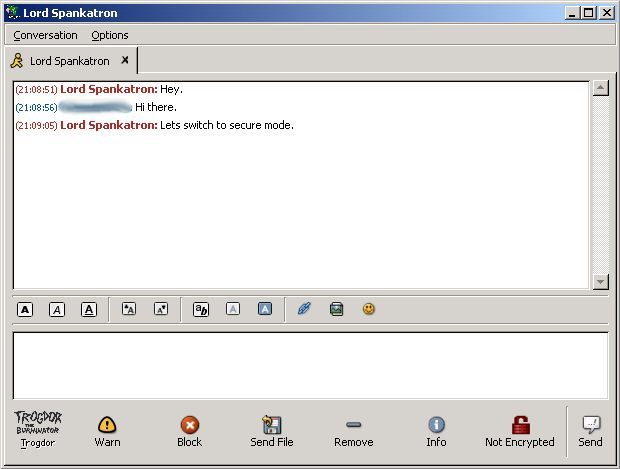
Figure 3.7
The red lock icon labeled “Not Encrypted” at the bottom showed the chat was in plain text. If the buddy also ran ScatterChat, the user clicked the red lock and sent a message as usual. The icon turned yellow to show that the next message would start the secure channel:
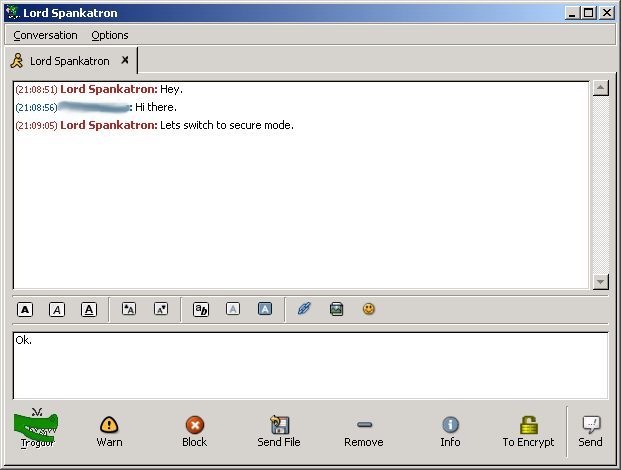
Figure 3.8
Once the secure channel was up and the buddy’s key had been verified (see the next section), the icon turned green:
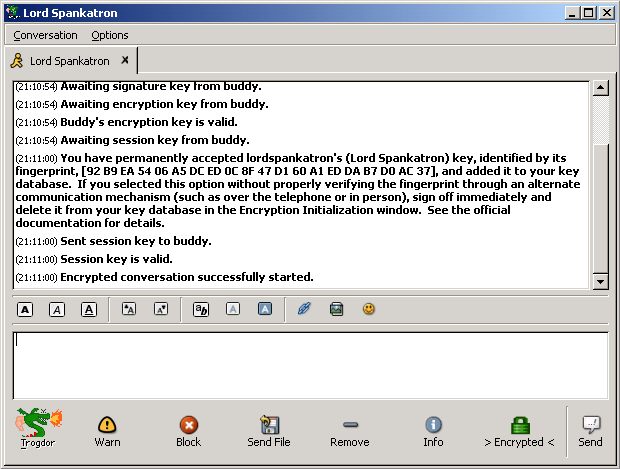
Figure 3.9
Modern messengers removed this step. Signal, for example, encrypts every chat end to end by default, so there is no button to forget.
3.4: Key Verification
When ScatterChat received an encrypted message from a key it had never seen, it showed a “New Key Fingerprint Detected” window:
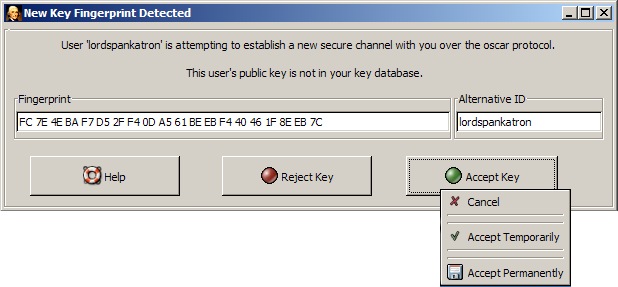
Figure 3.10
In this example, a buddy named “lordspankatron” wanted to start an encrypted conversation, but the computer had never seen his key before. That could happen for three reasons:
- The buddy was new to ScatterChat and had never had an encrypted chat with you.
- The buddy had chatted with you before but was now using a new key.
- Someone was impersonating the buddy.
From your side, reasons 2 and 3 look exactly the same. That is why key verification matters so much, and it is just as true for every encrypted messenger today.
The window offered three choices:
| Option | What it did | Revealed you used ScatterChat? |
|---|---|---|
| Reject Key | Refused the encrypted conversation and forgot the key. If you had not started the chat, it was meant to hide that you could use encryption at all. | Intended not to (researchers later disputed this; see Section 4) |
| Accept Temporarily | Allowed this one conversation. Future requests from the same key would ask again. | Yes |
| Accept Permanently | Allowed this conversation and accepted the same key automatically from then on. Only meant for keys you had already verified. | Yes |
The guide told users in countries where encryption was illegal to reject all keys from strangers. The idea was to stop outsiders from learning that the user ran ScatterChat rather than plain Gaim, the open-source client ScatterChat was based on. (Gaim became Pidgin after a settlement with AOL that the developers announced on April 6, 2007. Pidgin 2.0.0 came out on May 3, 2007.)
The verification method the guide described still works for any messenger:
- Write down the key fingerprint shown in the warning.
- Reject the key, or accept it only for this session, depending on how cautious you need to be. Do not accept it permanently yet. If you accept it temporarily, remember that the other person may be an impostor.
- Check the fingerprint through a separate, trusted channel. Meeting in person is best. Compare what you wrote down with the fingerprint on your buddy’s own screen. In ScatterChat, that was shown in the Encryption Initialization Window (Figure 3.1).
- If they match, the key belongs to your buddy, and you can trust it. In ScatterChat, that meant accepting it permanently next time or adding it by hand to the key database (Section 6.1).
- If they do not match, do not trust the key. In ScatterChat, a key accepted permanently by mistake had to be deleted from the key database (Section 6.1).
You cannot verify a key inside the same conversation you are trying to check. You do not yet know who is on the other end, so asking is like saying “are you an impostor?” The answer will always be “no.”
Signal uses the same idea. Each one-to-one chat has a safety number, found in the chat settings under View Safety Number. Signal’s support documentation says that if the numbers match, you can be sure you are talking to the right person. As with ScatterChat, the comparison only proves something when it happens outside the chat itself: in person, or over another trusted channel.
4. How to Avoid Getting Tricked
The original guide said there were “no known attacks” on how ScatterChat worked, and that the real risk was users being tricked. Both halves turned out to be only partly true. The social engineering warnings below are still sound. The technical claim did not hold.
Published Flaws in ScatterChat (August 2006)
On August 11, 2006, researchers at the University of Cambridge Computer Laboratory reported three problems with ScatterChat’s protocol on the lab’s Light Blue Touchpaper blog:
| Issue | What the researchers found | Effect on users |
|---|---|---|
| ECB mode with custom padding (CVE-2006-4021) | Chat messages were encrypted in ECB mode with a home-made padding scheme. A birthday-style attack could find repeated blocks and reveal patterns in messages. File transfers used CTR mode and were not affected. | An eavesdropper could learn about message content without breaking AES. |
| Capability probing | The software answered requests from unknown users. | The “Reject Key” privacy promise did not fully hide that someone was running ScatterChat. |
| Limited forward secrecy | Past messages stayed safe if one person’s long-term key was stolen, but not if both were. | Weaker than true perfect forward secrecy, which protects past sessions even if both long-term keys are taken. |
The researchers called the flaws non-critical but important for some threat models. They recommended Gaim with the Off-the-Record (OTR) plugin over Tor as an alternative. Their headline, “Protocol design is hard,” is the lasting lesson: custom cryptographic protocols that have not been reviewed tend to fail in ways their authors do not expect.
Trick 1: “Verifying” a Key Through the New Connection
The first trick is to start an encrypted conversation with a buddy for the first time and then check the fingerprint through that same connection (see Section 3.4). This proves nothing, because the whole point of verification is to find out who is on the other end.
If someone starts an encrypted chat with you for the first time and urges you to trust their key for any reason, treat them as an impostor. At best, they do not understand how verification works.
Trick 2: A Stolen Account With a New Key
The second trick is to steal your buddy’s account password, create a new key and start an encrypted chat. Because the key is new, you see the new-key warning (in ScatterChat, the window in Figure 3.10). If you skip any of the verification steps, the impostor wins.
Follow every step every time a new-key warning appears. This applies directly to modern apps: when Signal says a contact’s safety number has changed, the usual reason is a new phone or a reinstall, but you can only rule out an impostor by checking again outside the chat.
5. Tor
5.1: What Tor Is
Tor is free software and a volunteer-run network that sends your traffic through several relays. That makes it hard for any single observer to link you to the sites or services you connect to.
When the guide was written in July 2006, it described Tor as a project sponsored by the Electronic Frontier Foundation, hosted at tor.eff.org. That was accurate for the time. The EFF began funding Tor developers Roger Dingledine and Nick Mathewson in 2004 and acted as the project’s early fiscal sponsor. On December 22, 2006, the developers incorporated The Tor Project, Inc. as a Massachusetts nonprofit, and the project now lives at torproject.org.
The guide explained why Tor and encryption work well together. Without Tor, anyone watching the network can see which IM service a user connects to and from where. Encryption hides what is said but not who is talking. In some countries, using encryption is itself illegal or suspicious. Tor helps by making it hard for observers to tell who is communicating.
The guide’s conclusion, that encryption plus Tor meant an eavesdropper could tell neither who nor what, overstated things. Tor hides your IP address from the service and from local observers. It does not hide an account that is tied to your real name. It cannot stop an adversary who can watch both ends of a connection and match up timing. No tool combination makes anyone fully anonymous.
5.2: How ScatterChat Used Tor
ScatterChat put its Tor settings under Options > Configure Tor in the Encryption Initialization Window:
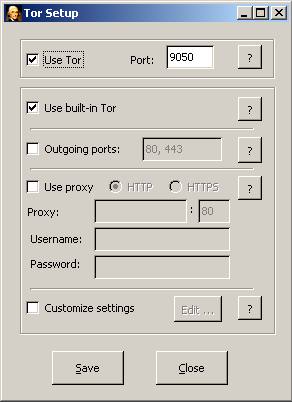
On Windows, ScatterChat came with its own copy of Tor, turned on with the “Use Tor” and “Use built-in Tor” options. Users behind restrictive firewalls could limit Tor to specific “Outgoing ports.” Users who had to go through a proxy could set it under “Use proxy.” Advanced users could pass options straight to Tor under “Custom settings.” The guide warned against changing the port and proxy settings unless they were really needed.
That bundled Tor is now nearly two decades out of date and should never be used. Today, the Tor Project distributes Tor Browser and the Tor software directly, with regular security releases.
5.3: Using Tor Correctly
In 2006, the guide said Tor was still experimental and should not be relied on when strong anonymity was needed. Tor has matured a great deal since then, but the core advice in this section has aged well.
To communicate anonymously, you cannot use an identifiable account. A screen name you have used for years, or a phone number registered in your name, points straight back to you. An anonymous identity has to be created anonymously and must never be used without Tor, or one slip can link it to you.
Your habits can also give you away. How you type, your grammar and capitalization, your writing style, and the times you come online and go offline can all identify you. Stay aware of this the whole time.
6. Advanced Features
6.1: The Key Database
ScatterChat stored every trusted buddy key in a key database. Keys were added when a user chose “Accept Permanently” in the “New Key Fingerprint Detected” window (Figure 3.10). Users could also edit the database by hand.
Adding a key by hand: In the Encryption Initialization Window, the user clicked “Show Database” to open the “Public Key Hash Database” section, then clicked “Add.” In the “Add Entry” window, they typed the key fingerprint and the buddy’s IM screen name and clicked “OK.”
Editing a key: After clicking “Show Database,” the user selected an entry, clicked “Edit,” made changes and clicked “OK” to save.
Deleting a key: After clicking “Show Database,” the user selected an entry and clicked “Delete.”
7. Dealing With Problems
This section gave advice for problems users were likely to run into.
“I accepted a key I shouldn’t have. What now?”
The guide’s advice was not to panic. Stop chatting with everyone and sign off right away. In the Encryption Initialization Window (Figure 3.1), click “Show Database,” find the wrong key in the “Public Key Hash Database” list, select it and click “Delete.” That returned the software to how it was before the mistake.
Deleting the key could not undo anything already said. If sensitive information had gone to an untrusted person, no software could take it back.
“A government raided my house and took my encryption keys. Now what?”
The original guide named the governments of China, North Korea, Cuba and Iran as examples. With your keys, a government or anyone else can start new conversations with your buddies while pretending to be you. Warn your buddies if you can do it without exposing them or putting yourself in more danger. Until then, the only defense is buddies who notice changes in your writing style, mood or personality.
The guide said past conversations would stay unreadable thanks to perfect forward secrecy, because decrypting them required both buddies’ keys. As the Cambridge researchers pointed out in August 2006, that is a weaker guarantee than true forward secrecy: if the attacker also got your buddy’s keys, recorded conversations were at risk. Modern protocols such as the one Signal uses generate fresh keys continuously, so stealing long-term keys later does not unlock earlier messages.
FAQ
Is ScatterChat still available or safe to use?
No. ScatterChat was abandoned long ago and has had no maintenance or security fixes for many years. It has a published flaw in how it encrypted messages (CVE-2006-4021), and AIM, the main network it ran on, closed on December 15, 2017. Any copy you find today is outdated and should not be trusted.
Who made ScatterChat, and why?
Hacktivismo, a group that grew out of the Cult of the Dead Cow, released ScatterChat at the HOPE conference in July 2006. It was a modified version of the open-source Gaim client, meant for activists and dissidents under oppressive governments. It combined end-to-end encryption, encrypted file transfer and built-in Tor routing.
What was wrong with ScatterChat’s encryption?
In August 2006, Cambridge researchers found three problems. Chat messages used ECB mode with a custom padding scheme that could reveal patterns (CVE-2006-4021). The software answered probes from strangers, which gave away that a person was using it. Its forward secrecy failed if both users’ long-term keys were stolen. The researchers called the flaws non-critical but meaningful for high-risk users.
What should people use instead of ScatterChat today?
For most people, Signal is the practical replacement. It encrypts every chat end to end by default, its protocol has been studied in published research including recent work on its post-quantum PQXDH handshake, and it lets you check contacts with safety numbers. Briar sends messages peer to peer over Tor or local networks without a central server, and Cure53 audited it in 2017. People who still use XMPP with Pidgin can add the OTR plugin, which is at version 4.0.2.
Does using Tor with an encrypted messenger make you anonymous?
Not on its own. Tor hides your IP address, and encryption hides what you write. Neither one hides an account linked to your identity, your writing style or habits, or an adversary who can watch both ends of the connection. Together they lower your risk, but they do not make you fully anonymous.
Is this website connected to the original ScatterChat project?
No. In 2006 and 2007, this web address was the home of ScatterChat. In 2026 the site relaunched under new, unrelated ownership as SC Privacy Desk, an independent guide to privacy, anonymity and secure messaging. It does not distribute ScatterChat or speak for its former developers.
Sources
- Protocol design is hard: Flaws in ScatterChat (Light Blue Touchpaper, University of Cambridge, August 2006)
- CVE-2006-4021 (National Vulnerability Database)
- Hacktivismo releases secure IM for activists and dissidents (CSO Online)
- ScatterChat announcement on the debian-devel mailing list, July 2006
- Tor Project: History
- The Tor Project (Wikipedia)
- Surveillance Self-Defense: How to Use Signal (EFF)
- What is a safety number? (Signal Support)
- Bundled Authenticated Key Exchange: Signal’s handshake protocol (USENIX Security 2025)
- Briar beta released, security audit by Cure53 (Briar Project, 2017)
- Off-the-Record Messaging downloads
- Gaim IM client renamed to Pidgin (BetaNews, April 2007)
- AOL discontinuing AIM (CBS News)
- Yahoo Messenger will shut down on July 17th (Engadget)